Overview
The personalization expander provides quick access to personalization placeholders and predefined personalization rules. It is used to insert contact attributes, simple personalizations, and existing rule logic directly into message content without switching to another interface. It also offers shortcuts to the Personalization Builder for editing or creating advanced logic.
For a conceptual overview of email message types and the overall email creation workflow, see the Email Channel Basics.
Navigation Path
Create New > Message > Email Message > HTML Email > Create > Personalization
You can also access it from draft messages: Messages > Draft Messages > Email
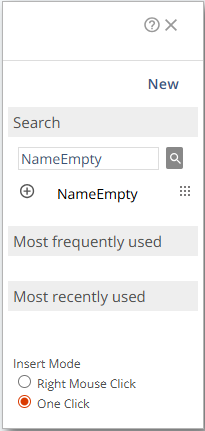
Settings
Setting | Description |
|---|---|
New | Opens the Personalization Builder to create new personalization rules using InsertIf/InsertElse logic. |
Search | Searches for existing personalizations. The search supports auto-suggestions. |
Most frequently used | Shows the personalizations used most often in your system. An initial set of five can be configured during onboarding, but will be updated over time. |
Most recently used | Shows the last five personalizations inserted through the expander. |
Insert Mode | Defines how personalizations are inserted:
|
Actions
Action | Description |
|---|---|
| Selects a personalization for insertion. Behavior depends on the chosen Insert Mode. In Right Mouse Click mode, the cursor shows a red circle that turns green when insertion is possible. |
| Allows dragging a personalization into the message content. Complex personalizations cannot be applied to entire sections using the drag-and-drop feature. |
| Opens the full list of available personalizations. Personalizations can also be deleted here. For details, see /v1/docs/personalization-wizard#search. |


Search
The Search for Personalization panel presents a list of all available personalizations in your system. It is also possible to delete personalizations within this view.
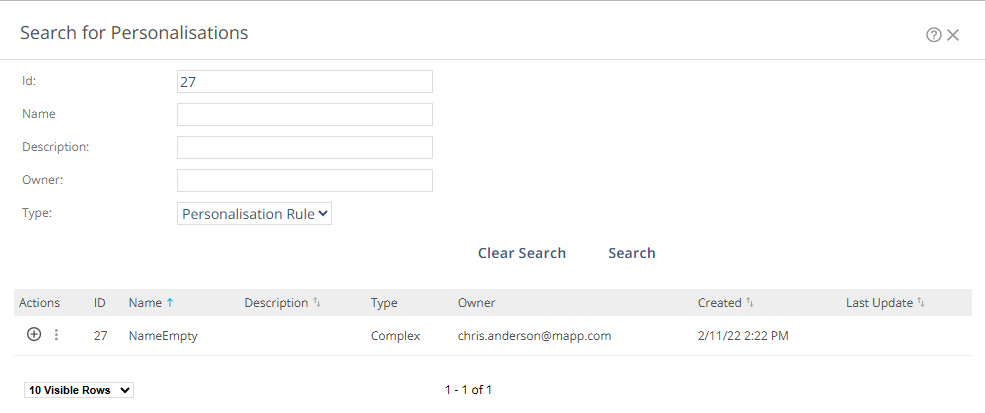
Action | Description |
|---|---|
Id | Searches for personalizations by its system-generated identifier. |
Name | Lets you search for a personalization by its name. |
Description | Lets you search us ing keywords or phrases that appear in the personalization’s description. |
Owner | Searches for a personalization created by a specific user (or the assigned owner, if it has been changed). |
Type | Filters results by personalization type. Available options:
|
Clear Search | Removes all search criteria and shows the full list of available personalizations. |
Search | Executes the search using the defined criteria. |
The expander is designed for efficiently inserting existing personalizations. For complex logic with multiple conditions or fallback structures, use the Personalization Builder or Code View.