Mapp Intelligence offers several ways to send tracking data. They differ in how well they withstand tracking blockers, how much effort the integration takes, and how easy it is to debug. This page helps you choose the right option.
For most websites, a custom track domain with an A/AAAA-Record is a good balance: it takes little effort and noticeably improves resistance to tracking blockers. Server-based options achieve the highest resistance but require development work on your side.
Comparison
Option | Resistance to tracking blockers | Integration effort | Debugging |
|---|---|---|---|
Default track domain | Very low | Very low | Easy |
Custom track domain (CNAME) | Low (medium with obfuscation) | Low | Easy |
Custom track domain (A/AAAA-Record) | Medium (high with obfuscation) | Low | Easy |
Proxy | Medium (high with obfuscation) | Medium | Medium |
Server-to-server | Very high | High | Not possible with browser tools |
Hybrid server-to-server | Events: medium (high with obfuscation) | Very high | Limited to events |
Obfuscation: Request obfuscation changes the request URL and the tracking parameters dynamically, which makes it harder for tracking blockers to recognize tracking requests. It is a setting of the tracking pixel, see Smart Pixel: Advanced Settings or Pixel V4/5: Advanced. It does not apply to server-to-server tracking, because no requests are sent from the browser.
Debugging: Browser-based options can be checked with browser tools such as the Mapp Cloud Debugger. With server-to-server tracking, the requests never pass through the browser, so they cannot be checked there.
Browser-Based Options
With these options, the tracking pixel runs in the visitor's browser. Supported integrations: Smart Pixel, Tag Integration, Google Tag Manager (GTM), Tealium, CMS Extensions, and Pixel V4.
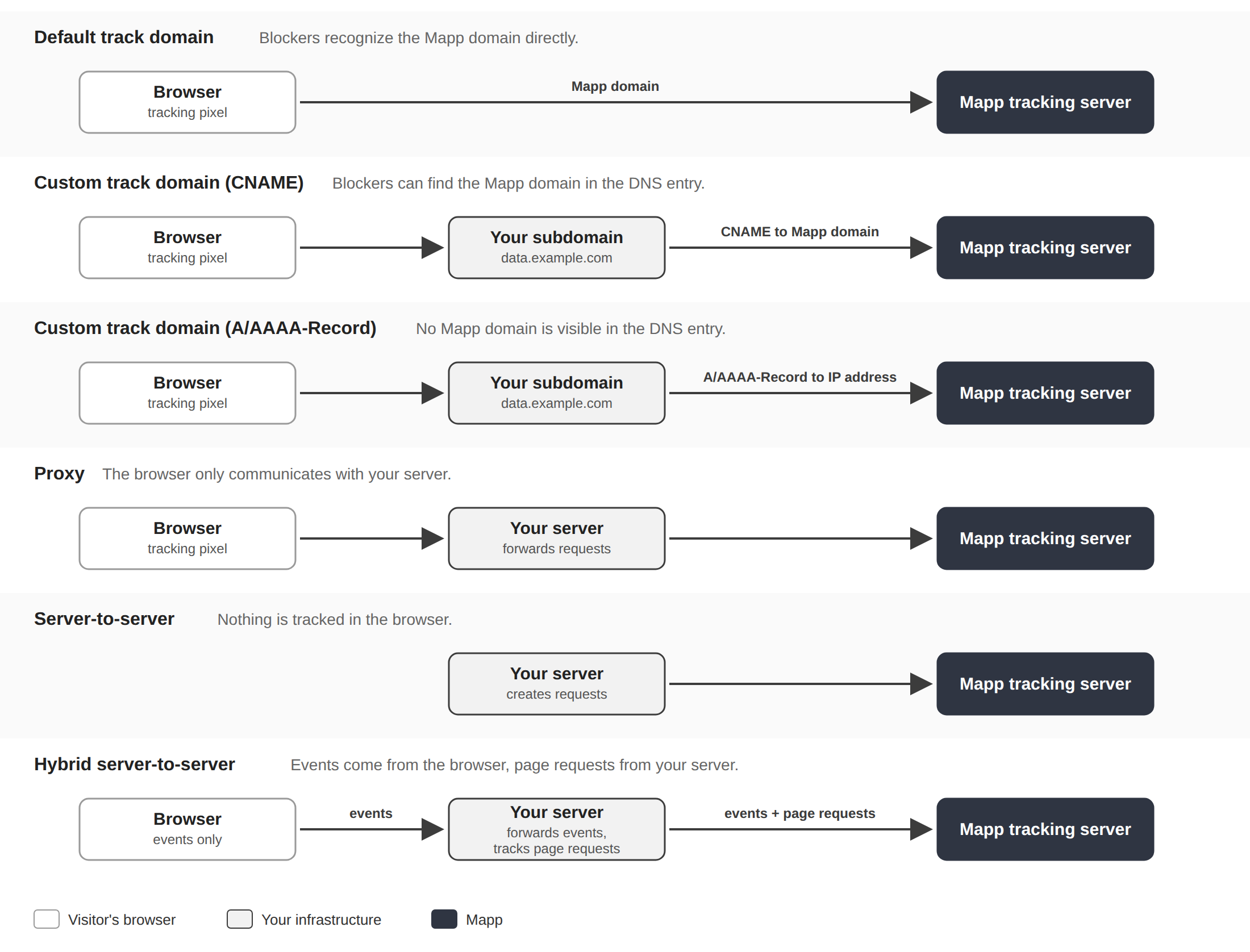
Default Track Domain
The browser sends tracking requests to the default track domain provided by Mapp. This requires no setup, but tracking blockers recognize these requests most easily.
Custom Track Domain
The browser sends tracking requests to a subdomain of your own website, for example data.exampleshop.com. A DNS entry connects this subdomain to Mapp:
A/AAAA-Record: The subdomain points directly to the IP address of the Mapp tracking server. Recommended.
CNAME: The subdomain points to a Mapp domain. Some tracking blockers resolve this entry and block the request.
See Custom Track Domain.
Proxy
The browser sends tracking requests to your own server, which forwards them to Mapp. See Server-to-Server Basics (Synchronous Pass-Through with tracking script).
Server-Based Options
Server-to-Server
Your server creates the tracking requests and sends them to Mapp. Nothing is tracked in the browser. Supported integrations: the server libraries (for example Java, PHP, or Node.js) or direct HTTP requests.
Hybrid Server-to-Server
The tracking pixel tracks events, such as clicks on elements, in the browser and sends them to your own server, which forwards them to Mapp. Page requests are tracked by your server and sent to Mapp directly. See the hybrid tracking sections of the server libraries.
Google Server-Side Tagging
Your own Google Tag Manager server sends the tracking requests to Mapp. Depending on your setup, this works like a proxy (the browser sends data to your GTM server) or like server-to-server tracking (your application server sends data to your GTM server). See Google Server-Side Tagging via GTM.
Mobile Apps
The mobile SDKs send tracking requests directly from the app. Browser extensions play no role here, but blockers that work on the network or DNS level can still affect app tracking. You can use the default track domain or a custom track domain. The track domain is set in the SDK initialization, see Android or iOS.
Consent
The tracking option only determines how data reaches Mapp. It does not change your consent obligations: the same rules for your visitors' consent apply, whether you track in the browser or on your server. See Consent, Cookies & Anonymized Tracking – Overview.
Browser restrictions on cookies, such as Safari ITP, are described in Browser Cookie Restrictions and Mapp Intelligence.